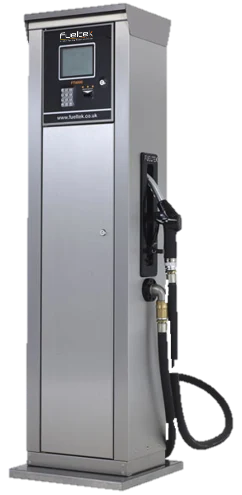
Connect authorised fuel issues with useful site records.
Our standard fuel management platform includes configurable features that we enable or disable to suit your operation. We match access controls, transaction prompts and reporting to your workflow, with optional equipment, integrations and services specified separately.
Control
Define who can dispense
Agree which drivers, vehicles, plant and other assets are authorised to use each fuel point. The terminal and chosen identification method form part of that process, with the transaction fields set around the information the site needs.
Specify the user, vehicle or asset, fuel point and readings required for each dispense. FMO gives the recorded transactions an operational context; agree how the team will review activity and maintain the underlying records.
Pump transactions describe fuel issued. Tankwatch adds measured stock, ullage, deliveries and movements at suitable tanks. Define the monitoring and reporting arrangement so the team can review these different records when investigating a discrepancy.
List the tanks, pumps, meters and controls already installed, together with the parts that need to change. FT4000 can provide separate control for compatible pumps; integrated dispensers provide another route when replacing or adding a fuel point.
From an authorised user to a reviewable fuel record.
01
Identify the user or asset
A driver, vehicle or asset is identified at the terminal before fuel is released.
Data tags or approved identification methods
Configurable prompts and validation
Controlled authorisation rules
02
Control the dispense
The system enables the selected pump and records the transaction as fuel is dispensed.
Accurate transaction records
Pump and nozzle control
Fuel assigned to the correct vehicle or asset
03
Report and review
Transaction and site information is made available through Fueltek reporting software.
Usage by vehicle, driver, site or period
Exception and trend review
Support for stock reconciliation
Two views of fuel. Connected reporting.
The fuel-control equipment records an issue at the pump. Tankwatch measures stock in the tank. Each provides information for a different part of the same operation.
Dispensing records
Approved identification leads to a controlled fuel issue. The terminal records the configured user, vehicle or asset, pump, quantity and other transaction fields.
Authorised teams review the available transaction and tank information through the configured reporting connection. A fuel issue record and a tank reading answer different questions when investigating a stock discrepancy.
A brief for each location, equipment to retain, shared reporting needs and any installation or handover constraints.
A site may combine these routes. Use System Finder to organise the requirement and compare product roles before discussing the final configuration.
Helpful answers
Frequently asked questions answered.
Can a fuel management system work with existing pumps and tanks?
In many cases, yes. Compatibility depends on the pump, tank, metering and control equipment already installed, so We review the site before recommending an integration or replacement approach.
Can the system support more than one site?
Fueltek solutions can support connected multi-site operations, allowing authorised teams to review fuel activity across separate depots from one reporting environment.
What information is recorded during a fuel transaction?
The exact record depends on the configuration, but commonly includes date and time, site, pump, user, vehicle or asset, fuel type, quantity and relevant mileage or hour readings.
UK location guides
Fuel management around the UK.
Compare planning priorities across 30 UK service areas, covering fleet types, storage, dispensing, reporting and existing equipment.
For a mixed-energy fleet, define the information route as carefully as the equipment.
LPG, CNG and charging records need explicit units, asset identities and a confirmed interface or import arrangement. Discuss the actual meters, providers and required reports as part of the system specification.