
Authorise the dispense
The terminal checks the approved identification and captures the information requested for the transaction.
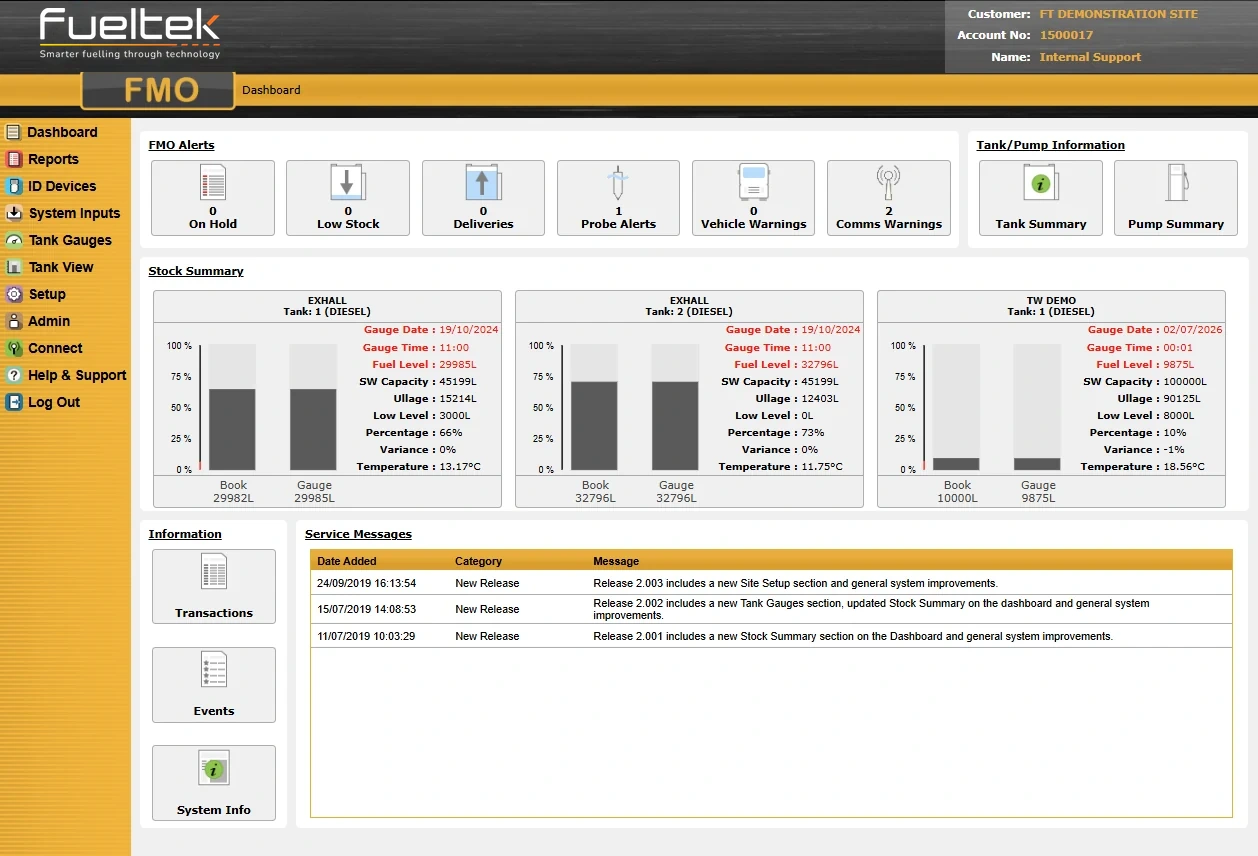
Fuel Manager Online · FMO
Fuel Manager Online (FMO) connects the information recorded at Fueltek fuel access terminals with a browser-based environment for authorised users.
It gives fleet, depot and site teams a clearer route from each fuel transaction to reporting, stock review and day-to-day administration.
How the information moves
FMO works with Fueltek Fuel Access Control Terminals at the fuelling location.
The terminal checks the approved identification and captures the information requested for the transaction.
The fuelling record is retained by the onsite control equipment and transferred through the configured communications route.
Authorised users can review transactions, stock information and operational reports through the browser-based service.
Away from the desk
FMO’s mobile views give authorised users a route to dashboard information, reports, ID records, tank gauges and connection tools while moving between sites.
The mobile dashboard shown here brings low-stock information, deliveries, probe alerts and communications warnings into a compact view. The information available still depends on the connected equipment, configured account and user access.
Explore the mobile screens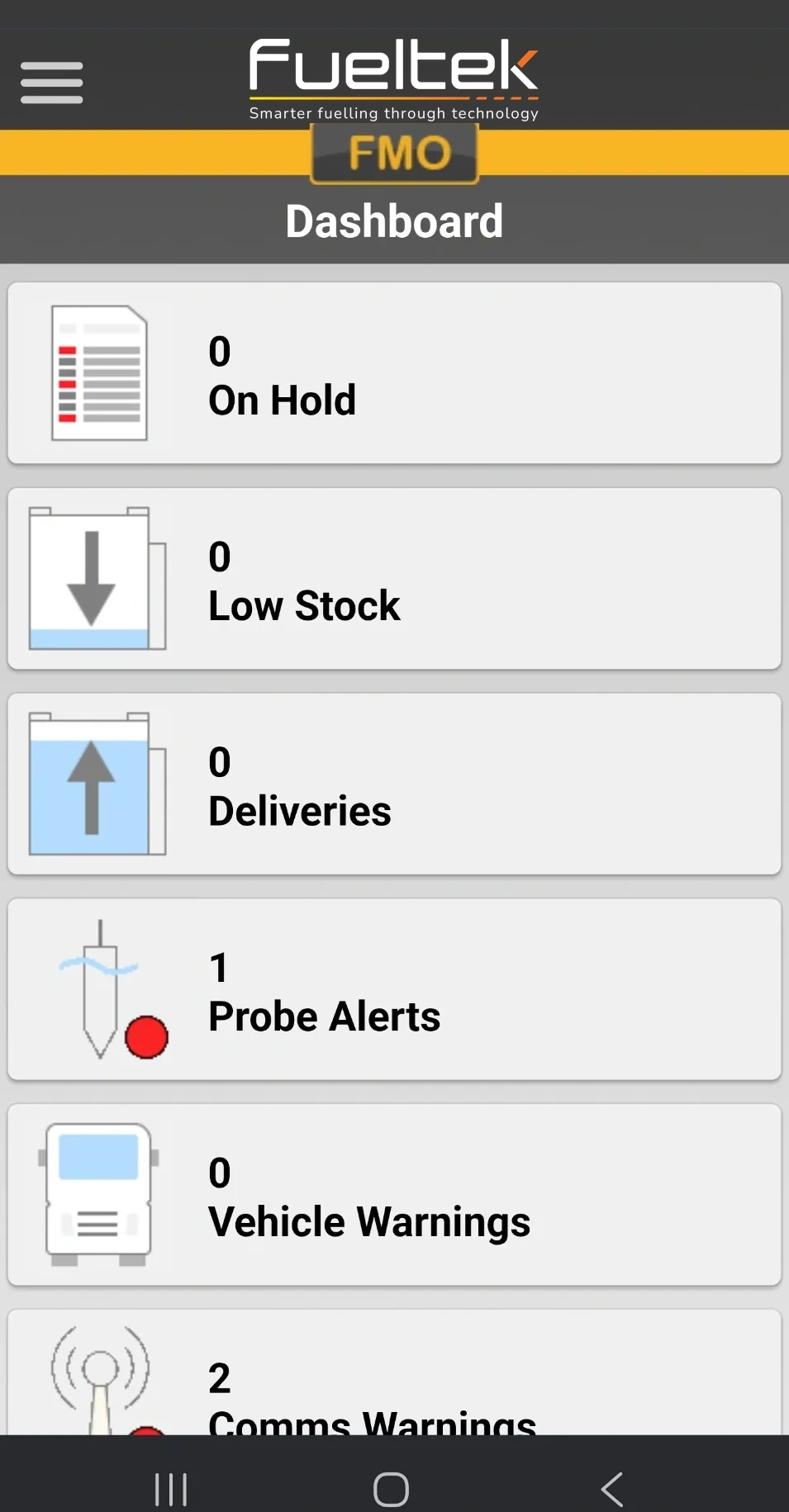
Operational visibility
Start with the question: a single fuel issue, a vehicle’s activity over a period or a site total. Review the relevant dates, quantities and identifiers captured by the configured system, keeping the reporting period consistent.
Explore the reporting screenReview recorded fuel issues alongside deliveries and configured tank information. A dispensing transaction and a measured tank reading describe different parts of the operation; use matching periods and update times when comparing them.
Compare measured and calculated stockAuthorised administrators maintain the users, vehicles and tags used by the connected system. Agree who records new assignments, handles lost tags and updates records when people or equipment change.
Compare driver, vehicle and asset assignmentsIn a configured multi-depot system, agree which sites each team needs to review. Keep site names, reporting periods and the intended grouping of records clear when reviewing activity across the operation.
Explore the tank overviewExplore the software
Open a task to see the relevant FMO screen and what to discuss with Fueltek. These are product screenshots; the records shown are examples. Available views and permissions depend on the agreed system configuration.
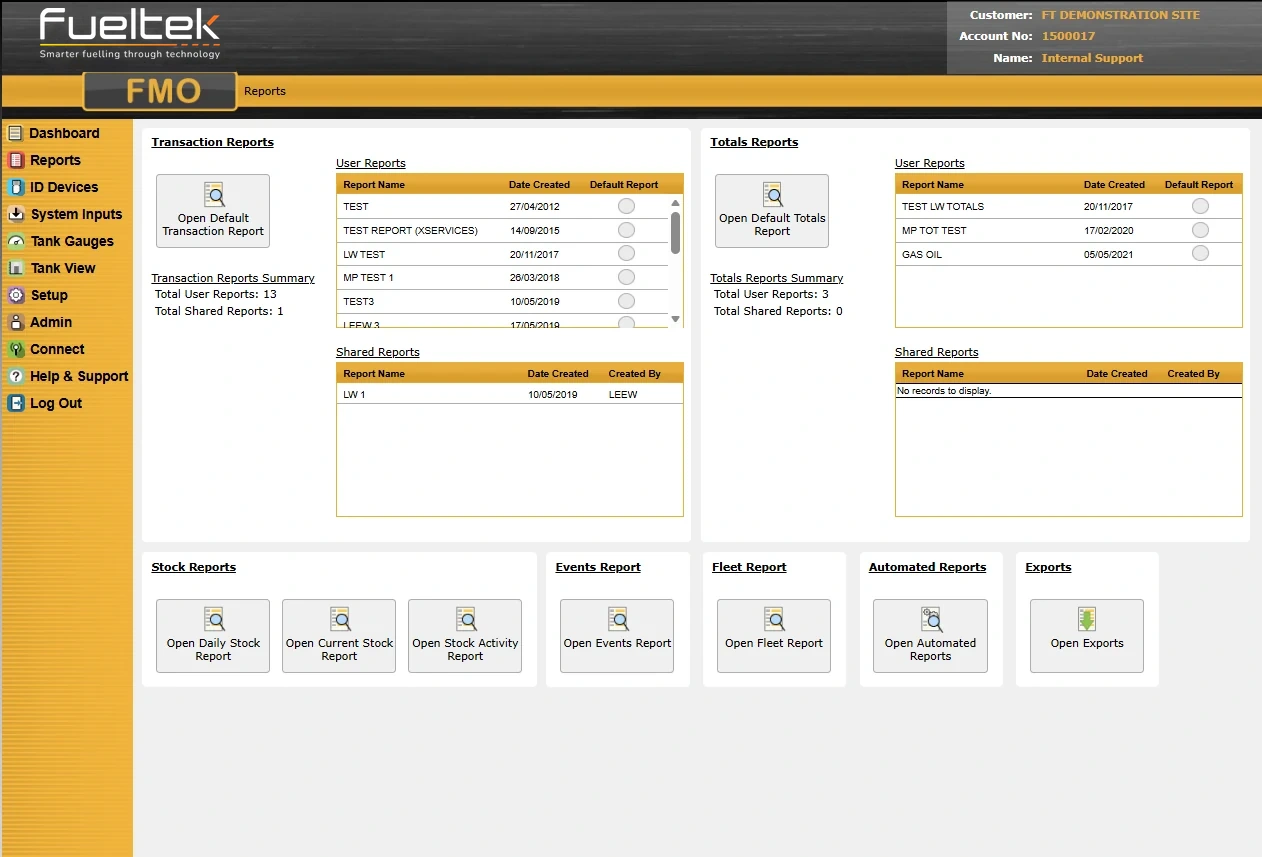
The Reports screen groups transaction, totals, stock, event, fleet and automated reports. Start here when a manager needs to understand recorded fuel activity.
Reports support investigation of a recorded issue, including the available dates, quantities, identifiers and site context.
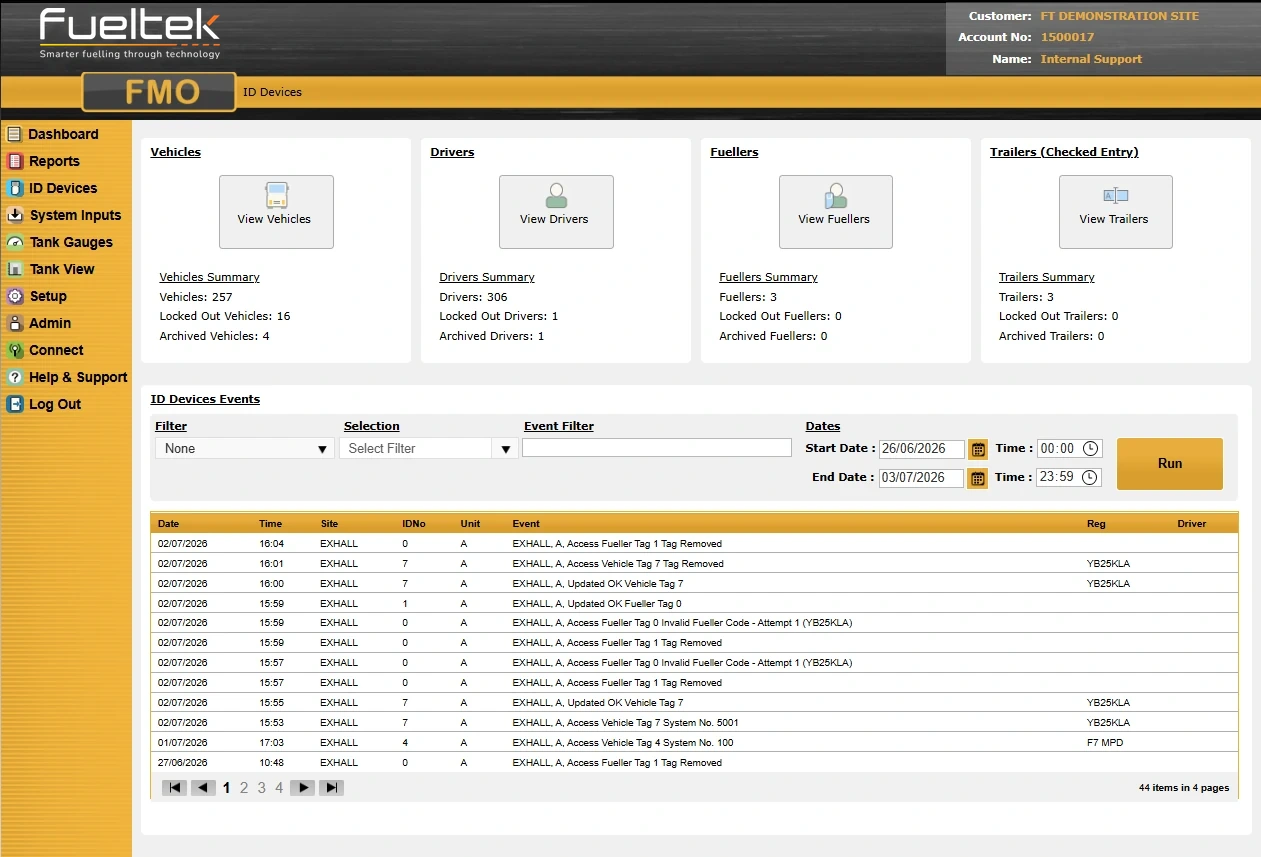
ID Devices brings vehicle, driver, fueller and trailer records together with event history. It provides the identity context behind authorised fuel activity.
Identity records link vehicle, driver, fueller and trailer information to the configured fuel activity and event history.
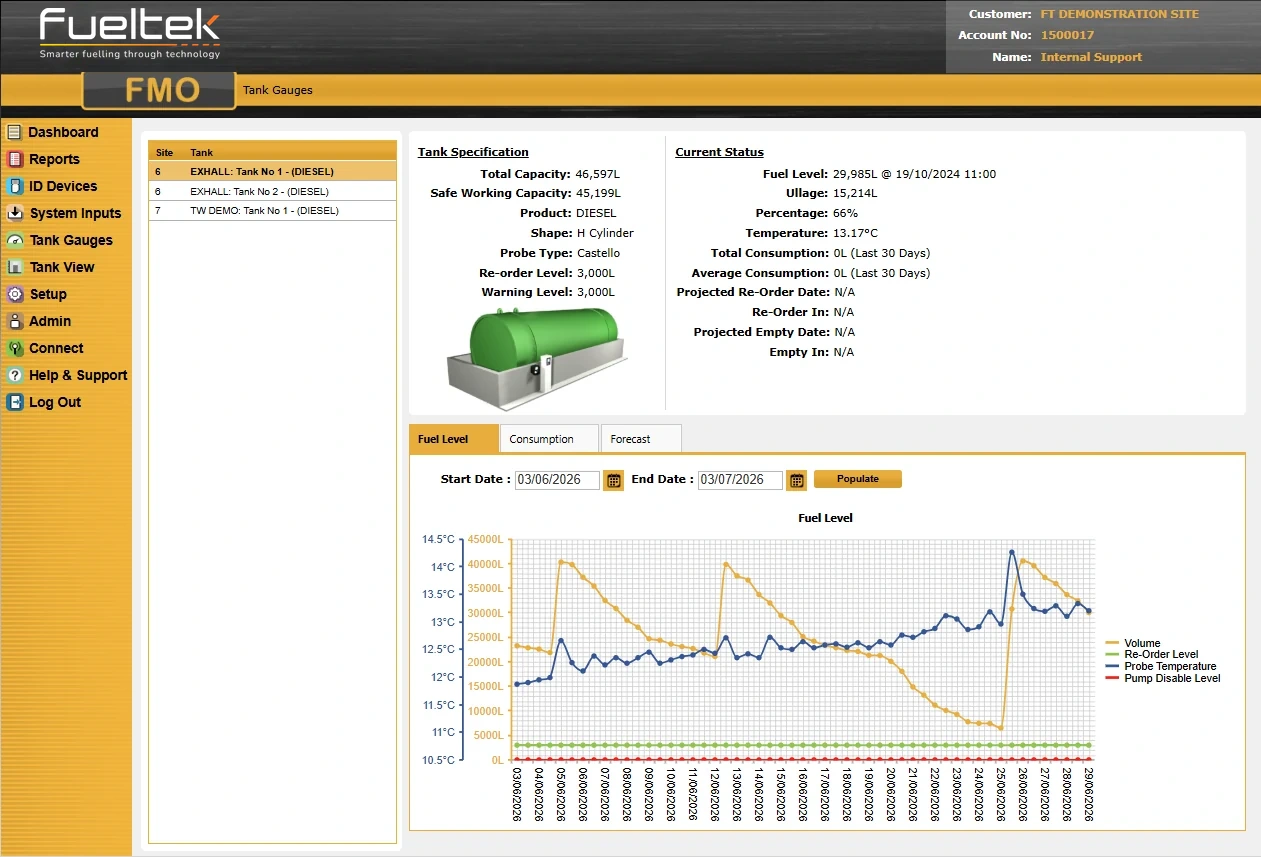
Tank Gauges combines tank information, current status and level history. Where tank monitoring is configured, it helps the team examine the movement behind a stock figure.
Tank information and level history show stock changes alongside the available consumption and forecast views.
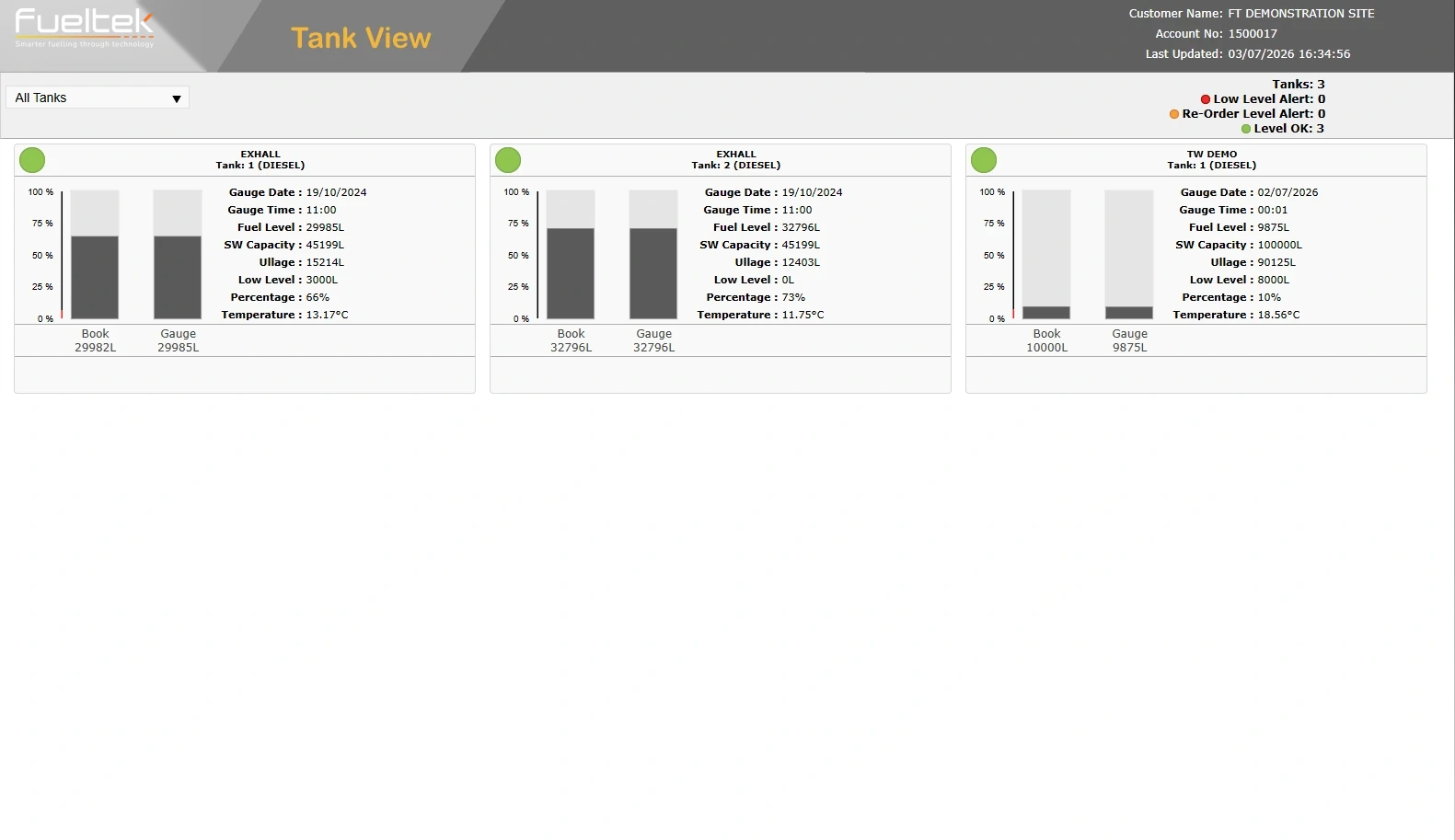
Tank View presents several tanks in one overview, with stock levels, status, warnings and update times. It complements the detail available for an individual tank.
The overview brings configured tank levels, status, warnings and update times together for multi-tank visibility.
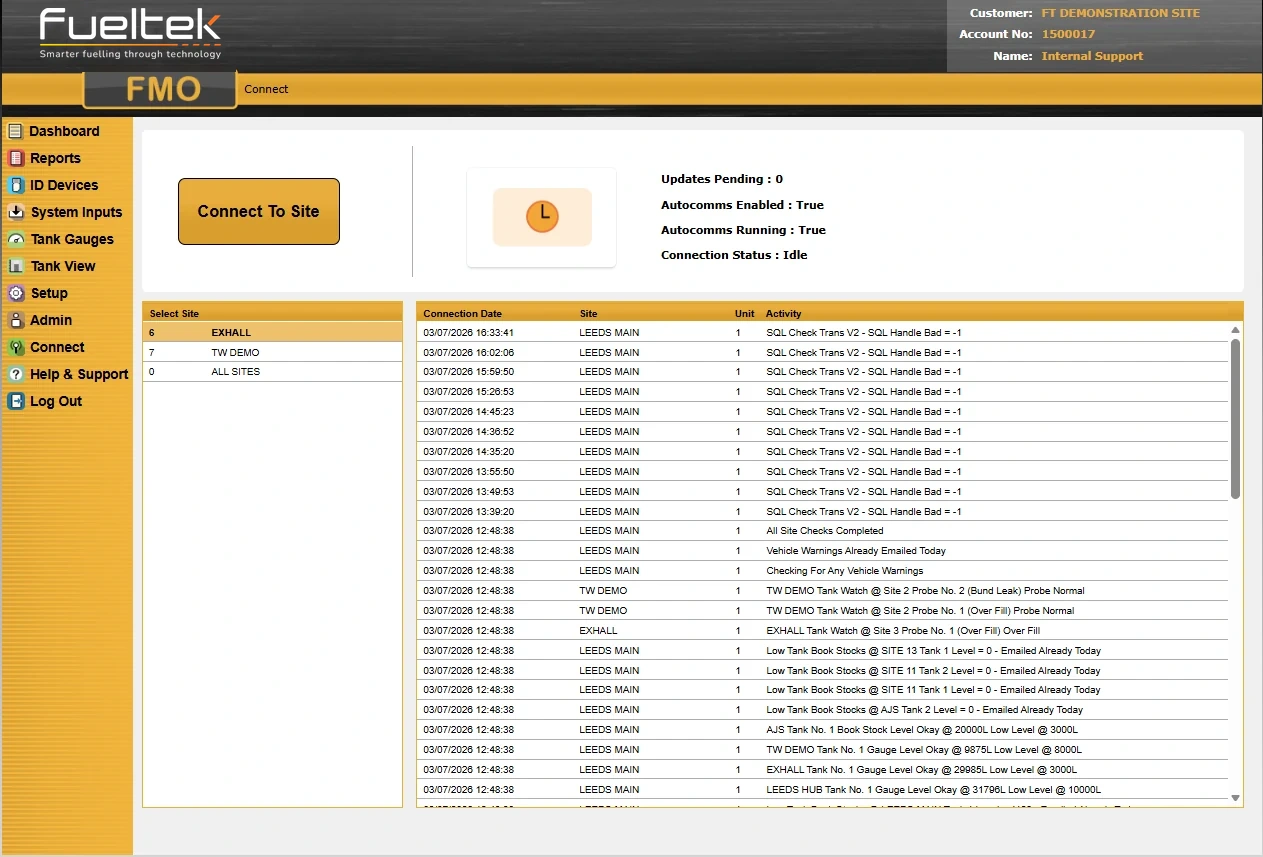
Connect shows the communications activity between FMO and the site equipment, including pending updates and autocomms status. This gives support teams context when records need checking.
Connection activity, pending updates and autocomms status provide context for site communications and reporting.
What to define
Connected Fueltek pages
Communications, permissions, data fields and reporting configuration are confirmed against the actual site and operating requirement.
Questions to settle
FMO is a browser-based service. The exact access, hosting and communications arrangement is confirmed for the proposed Fueltek system.
FMO supports connected multi-site operation when the terminals, communications and account structure are configured for that requirement.
The configured record can include site, pump, user, vehicle or asset, fuel quantity, time and relevant readings or references. We match the fields to your operation.
Next step
FMO can be configured around your fuelling process, existing reports and the exceptions your team needs to investigate. The reporting requirement determines which records, views and access arrangements are needed.
A demonstration around your operation
An FMO demonstration shows the relevant screens and how records are captured at your fuel point, with the hardware, communications and access arrangements explained for your operation.
Useful starting points include tracing a transaction, reviewing a tank’s stock movement or bringing several depots into one reporting process.
Opens an editable email with space for your site details and the tasks you want to explore.
Technical detail
FMO brings these reporting areas together. Available functions, imported data and permissions depend on your configured service.
| Reporting area | Useful detail | Configuration to agree |
|---|---|---|
| Individual transactions | When fuel was issued, the outlet, product and recorded identities. | Required prompts, timestamps and correction handling. |
| Vehicle, group and department totals | Usage and MPG grouped by vehicle, group or department. | Consistent identifiers, group assignments, mileage or operating-hour inputs. |
| Site stock and reorder information | Stock movements and configured low-stock/reorder information. | Measured versus calculated stock and the source of each record. |
| Offsite fuel-card data | Import offsite fuelling data from the major fuel-card companies and review it alongside onsite transactions. | Supported provider, import format, duplicate handling and vehicle matching. |
| Service and due-date records | Vehicle administration can include service, MOT, tax and tachograph-calibration due information within the configured service. | Available functions and who maintains dates/readings; these reports do not replace the responsible team’s compliance process. |
Administrator access controls, activity history and exports support daily administration. Formats, retention and access scope depend on your service arrangement.
Product information
Available communication options include 4G/LTE mobile data, LAN/WAN network interfaces, Wi-Fi, Bluetooth and RS232/RS485 links. We configure the connection around your equipment and the network available at your site.
Our 4G/LTE systems use roaming SIMs that can connect across the four main UK mobile networks, selecting an available network to suit coverage at your site. This provides online reporting without requiring fixed broadband at the fuel point.
The mobile connection uses a data rental rather than call charges. Your quotation sets out the applicable data allowance and connection charges alongside the wider software and support service.
A LAN/WAN interface can connect the system through your site network. RS232/RS485 links provide wired connections for compatible equipment. We match the interface and route to your installation.
Wi-Fi, Bluetooth and wired network or serial connections provide other routes where suitable infrastructure is available. These are options for the complete system, with the appropriate interface selected for each connection.
GPRS describes the earlier mobile-data connections used by existing installations. Our 4G/LTE option is described separately so the connection type is clear.
Technical information
FMO combines individual transactions, tank stock and vehicle or group reporting with access administration.
The report generator and filters let you define the view you need. Reports can be scheduled daily, weekly or monthly, with recipients and delivery arrangements set for your service.
Administrators maintain user access and the driver, fueller, vehicle and access-device records needed by the installation. Check lock-out changes have reached the relevant terminal.
Use the connection/status view with transaction and tank timestamps. A delayed connection can mean the latest local activity has not yet appeared in the browser.
FMO supports periodic data backups. Backup frequency, recovery and retention are defined by the software service; local transaction memory remains separate from hosted backups.
Product information
FMO compares calculated book stock with measured TankWatch stock. You can accept either balance using your knowledge of the site. Gauge and pump throughput comparisons help identify patterns that need investigation, while book deliveries provide the basis for fuel costing.
Recorded opening stock plus deliveries minus recorded issues gives the calculated balance. A tank reading is a separate measurement; matching periods, timestamps and communication status helps explain a difference.
Product information
FMO supports CO₂ monitoring alongside vehicle performance and fuel-use reports, helping your team review emissions information with operational results.
Product information
FMO works over an internet or intranet connection, with an individual login and password. Client devices access it through their browser without installing application software.
The platform scales from one location to networks with thousands of locations and supports multiple administrators and users. There are no additional-user charges.
Administrators can add, edit and block users, limit access to particular screens and functions, monitor user activity in real time and review the application activity history.
We provide remote hosting. Where we have access to the application, updates are applied automatically without user intervention and become available to all users.
Reports can be exported for use in Microsoft Word and Excel. Vehicle records support service dates or distance intervals, MOT, tax and tachograph-calibration due dates, alongside fuel-use reporting. Report columns, dates, units and totals support consistent summaries and analysis.
Mileage can be entered at the terminal or captured automatically through a compatible DataNozzle vehicle output or API integration. Consistent vehicle records, fuel periods and units support meaningful MPG reporting.
We match data integration to your business software, required records and update frequency. Formats, identifiers and responsibilities form part of the integration specification.
We avoid unnecessary software-licence charges and do not charge for additional users.
Individual accounts and permissions help your team manage access. Your quotation sets out the software, communications, integration and support included in the service.